

— Business management & accounting for Pakistan
Every rupee,
ایک کھاتہ۔ پورا کاروبار۔
Super Ledger runs your distribution, factory, counter and field sales on one double-entry ledger. Every sale, purchase, production run and payment posts a balanced journal entry the moment it happens, so the owner always sees one set of numbers.
- Windows + Android
- Works offline
- FBR Digital Invoicing
- English / اردو
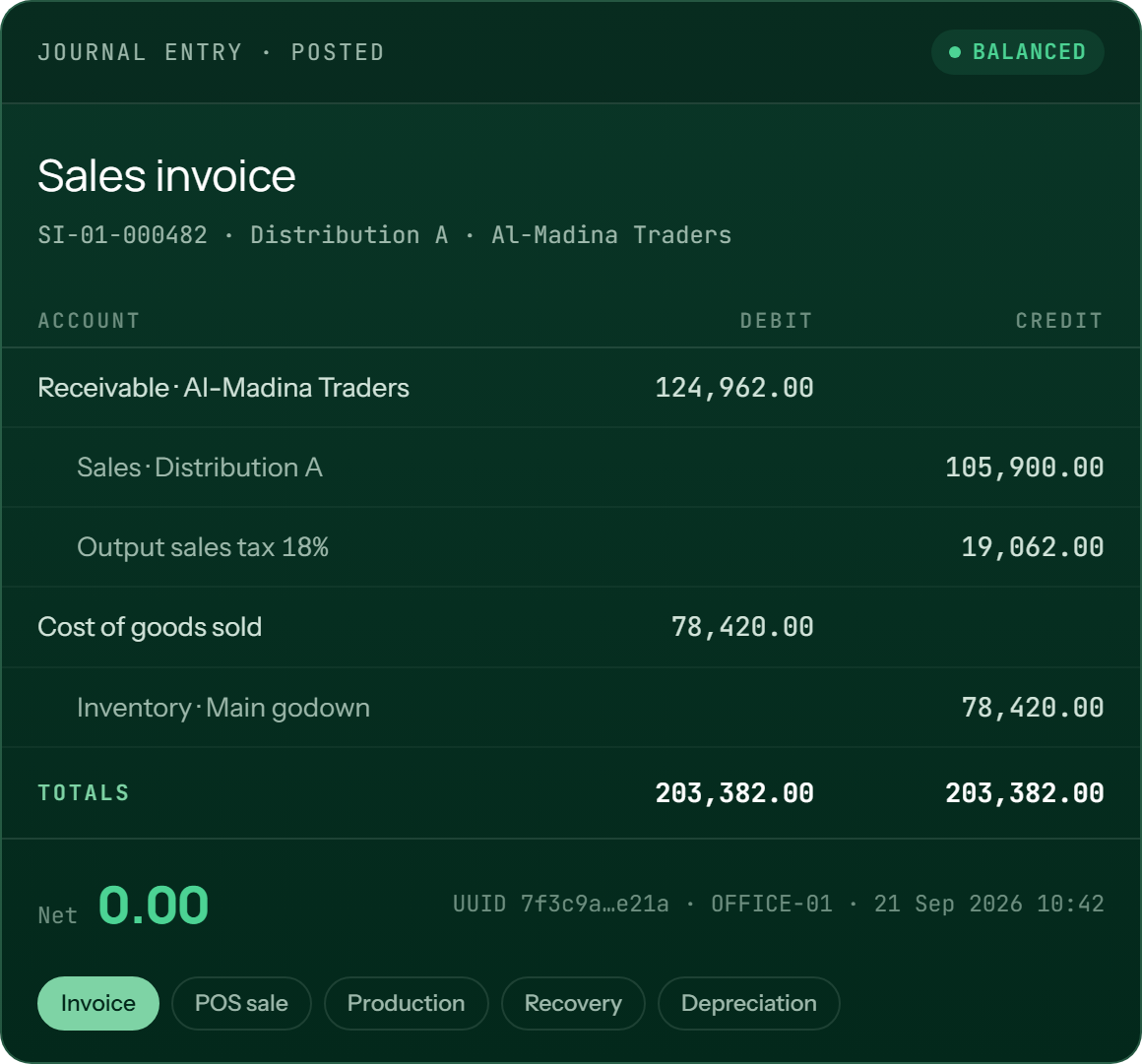
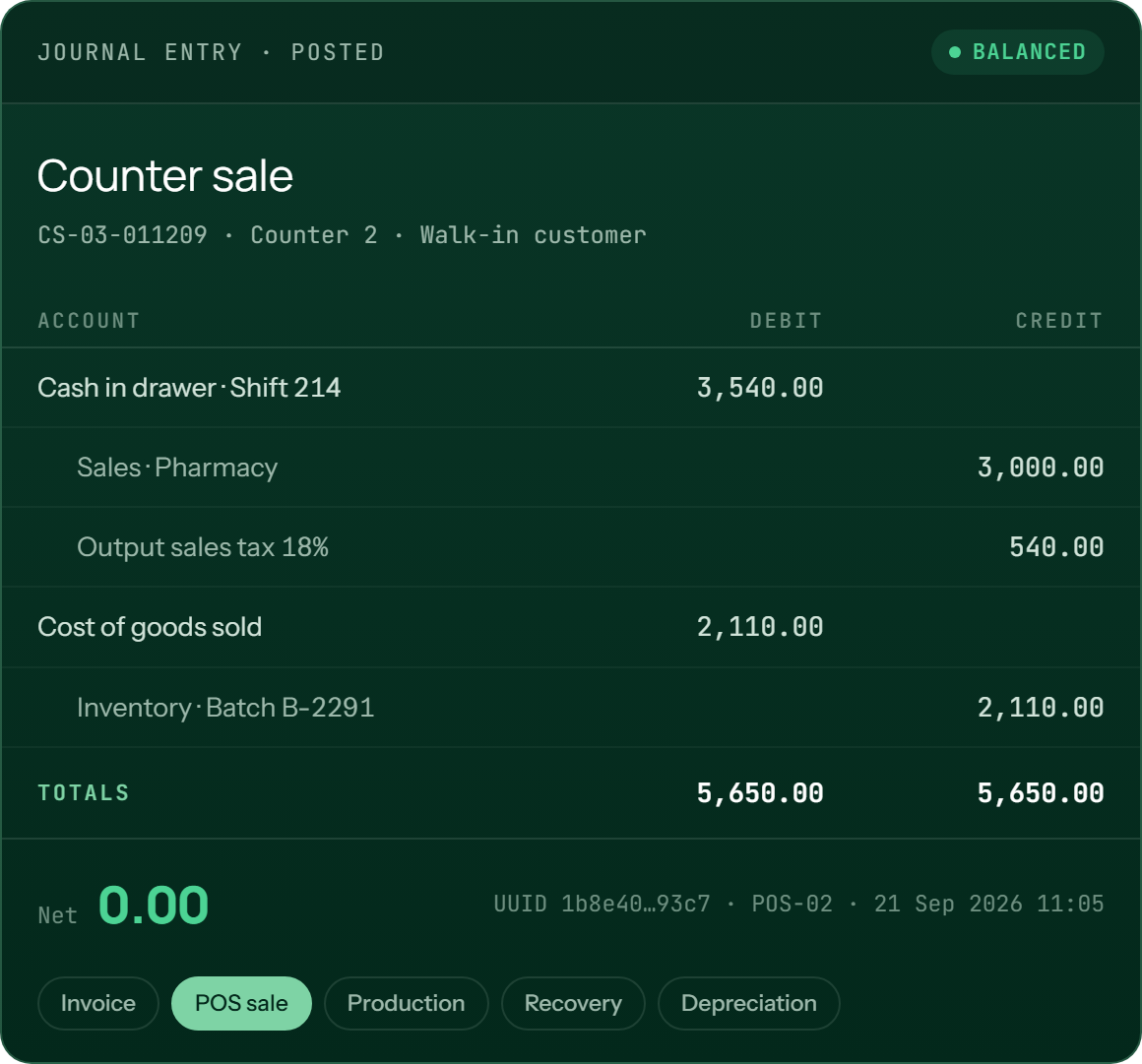
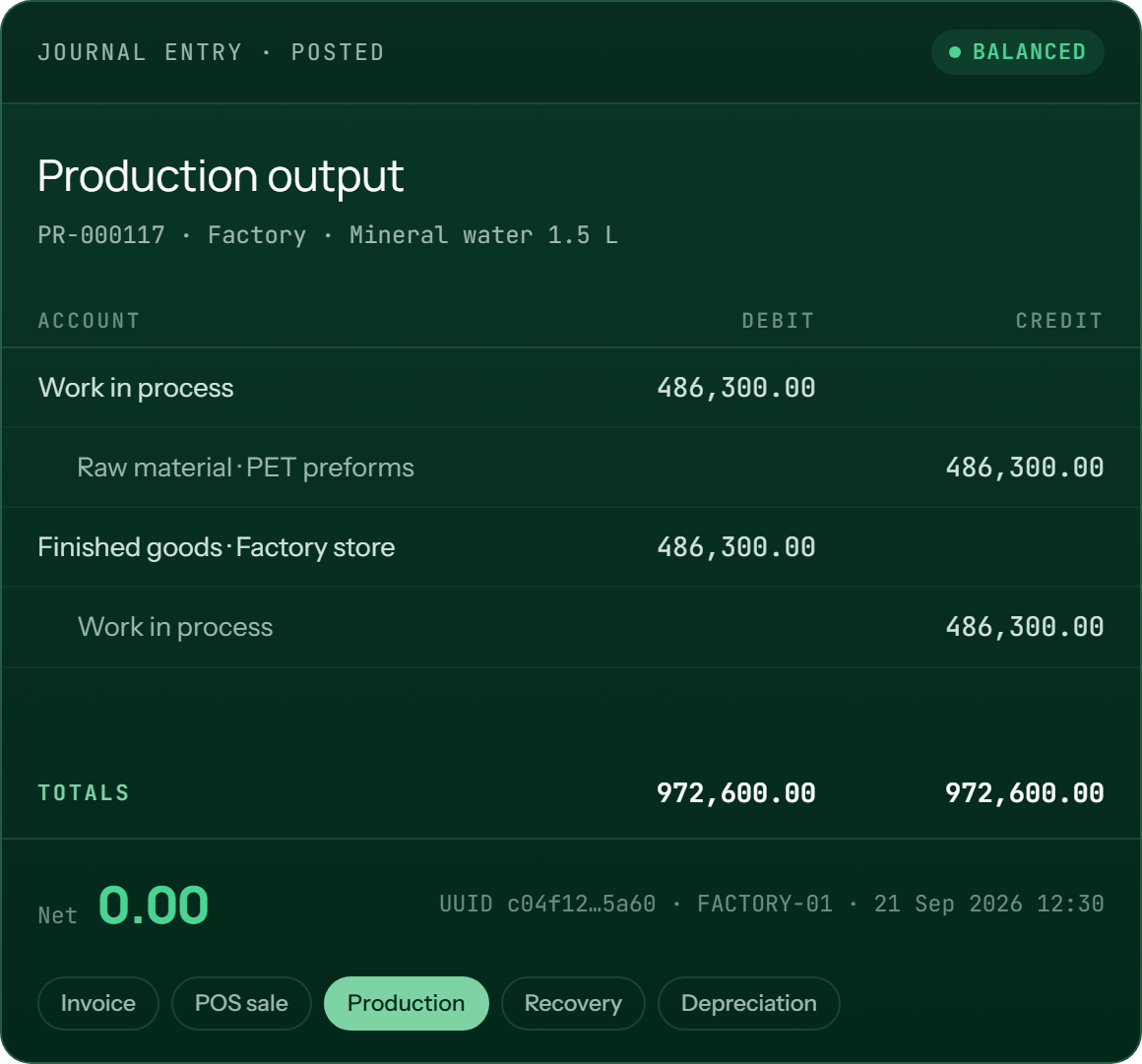
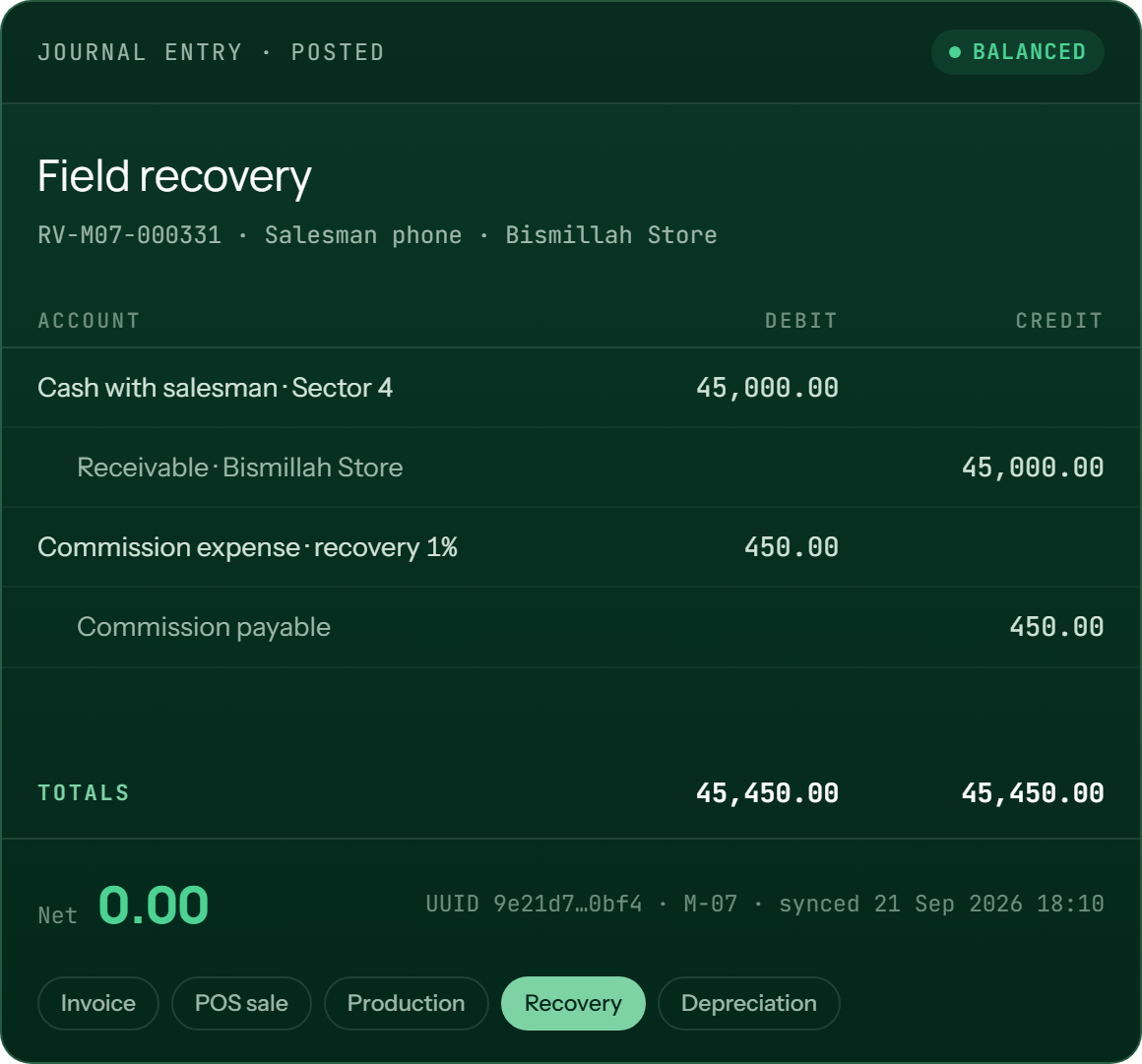
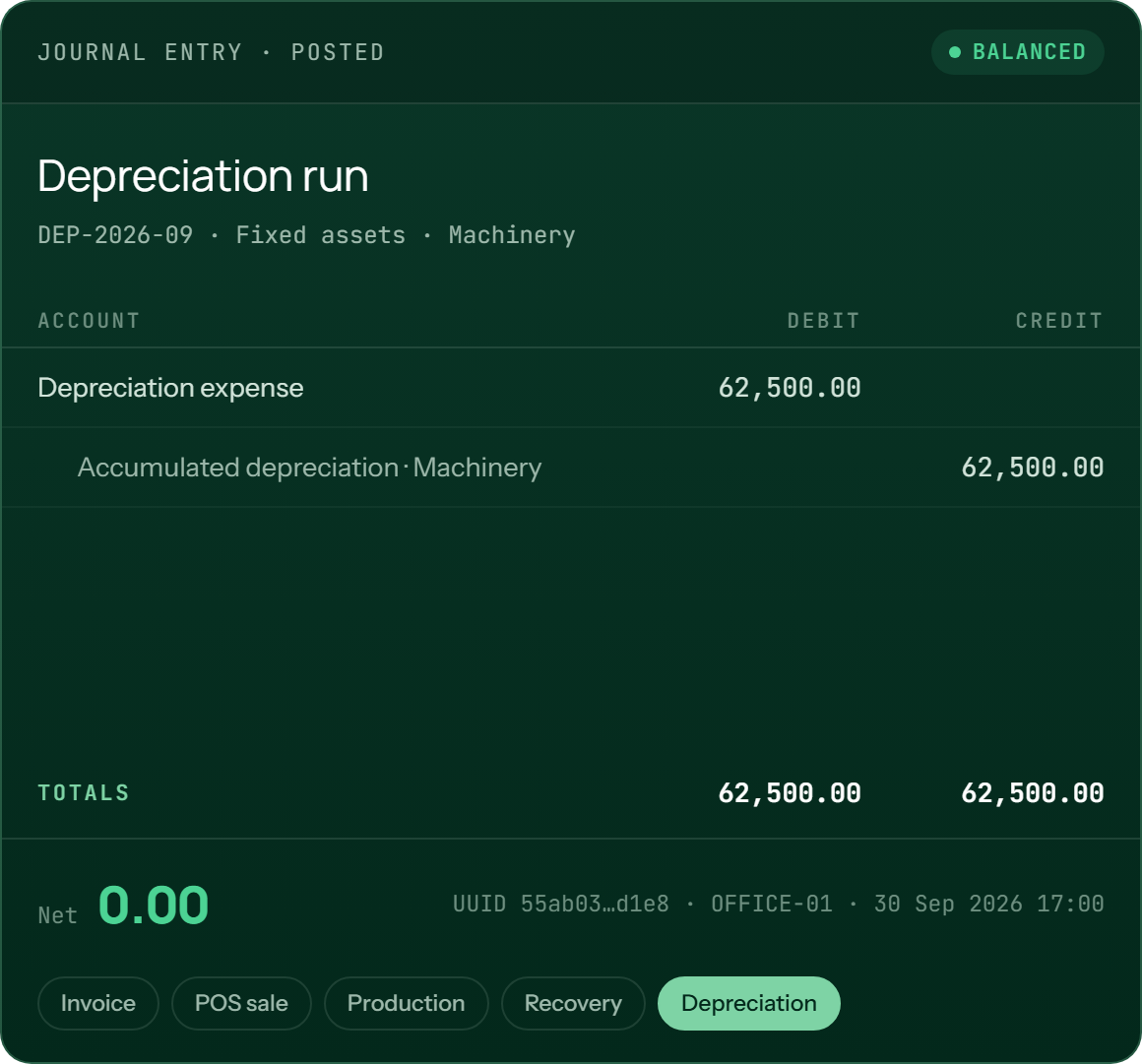
Every posted entry nets to zero. Unbalanced vouchers can’t be saved.
Factory, distributors and counter roll up to one balance sheet.
A change on one office screen appears on every other screen.
Salesmen work offline on their route, then sync at the office.
Full Urdu with right-to-left layout and Nastaliq printing.
— The problem it solves
Five tools give you five sets of numbers.
Most Pakistani SMBs run on a billing program at the counter, spreadsheets in the factory, a register for salesmen and an accountant reconciling it all at month-end. The numbers never agree, and by the time they do it’s too late to act on them.
Without Super Ledger
Books that catch up later
Month-end reconciliation
Sales, stock and cash live in different places and are matched by hand.
Salesman recoveries on paper
Cash collected on the route reaches the books days later, if it arrives at all.
Unknown product cost
Factory cost is guessed because electricity, wages and wastage never reach the product.
History gets rewritten
An old invoice gets edited and last quarter's report quietly changes.
FBR compliance on the side
Invoices are keyed in twice, and rejections show up without explanation.
With Super Ledger
Books that are already right
Posted the moment it happens
Every document posts its own balanced entry, and trial balance is ready at any time.
Field cash on the ledger
Recoveries post on the phone and reach the office the next time it syncs.
True cost at month close
Material at batch-date rates plus labour and allocated period costs, frozen in a snapshot.
History stays fixed
Posted rows can't be edited. Mistakes are fixed with reversing entries and credit or debit notes.
FBR built in
Invoices are checked against FBR's rules offline, queued, and printed with the FBR number and QR.
VALIDATE-TO-POST
Drafts stay drafts
An order, voucher or payroll run is a draft until you validate it. Validating posts the entry and locks the document, and a draft posts nothing.
PERIOD LOCK
Closed months stay closed
Every dated document must fall in an open accounting period. Back-dating a closed month takes a permissioned unlock, and the unlock is logged.
PER-TRANSACTION STAMPING
Reports don't drift
Salesman, operator, rate and device are copied onto each transaction. Moving a salesman to a new area never changes last month’s report.
— The platform
One codebase.
Each business gets the modules its licence includes. A distributor sees a distribution product, and a factory owner who also runs distributors sees both, reading from the same books. Every module shows exactly what it posts.
— Base · included in every licence
Accounting & Ledger
A double-entry engine that posts every entry whole or not at all. Everything else in Super Ledger writes to it.
- Multi-level chart of accounts with asset, liability, equity, income and expense types and sub-ledgers
- Vouchers: cash and bank payments and receipts, journal, general and future-dated
- Banking: cheque books, multi-cheque receipts and deposits, transfers and bank reconciliation
- Parties: customers, suppliers, service providers and contractors, with credit limits and opening balances
- Back-date window and future-dating rules applied to every date picker
- Credit and debit notes, round-off and amount in words on printed documents
- Financial statements: trial balance, P&L, balance sheet, cash flow, cash book and day book
- Owner dashboard with revenue, gross profit, cash, aging, top customers and slow movers
Guarantee
Σ Debit − Σ Credit = 0.00 on every entry. Money is stored as whole paisa, never floating point.
— Licensed module
Distribution & Sales
Built around how distribution works in Pakistan: areas, sectors, order bookers, van salesmen, trade offers and returnable bottles.
- Quotation → sales order → invoice, with partial invoicing and available-to-promise checks
- Price resolution: customer-specific price, then customer-type price, then default price, overridable on the line
- Trade offers, free goods, line, party and bill discounts, and a minimum selling price
- Territory: area → salesman → sector → customer, with 12-month route plans that skip holidays
- Van sales: van-load pick lists, field invoicing capped by the load, and returns with variance
- Recovery sheets, disputed amounts, customer claims and aging
- Returnables: empty-bottle security held as a liability, with replacement and refund flows
- Commission engine: sales, units, gross profit, recovery or target basis, with separate cash and credit rates
- Salesman day lock and day-end cash review at the office
- Business units: run several distributions, each with its own stock and profit, in one company
Posts
Dr Customer / Cash · Cr Sales · Cr Output tax — Dr COGS · Cr Inventory
— Shared stock ledger · with Distribution, Factory and POS
Inventory
One stock ledger for every location. Warehouses, godowns, showrooms, vans and the factory store all show quantity and value.
- Multi-location stock with transfers, stock counts and manual adjustments that require a reason
- Batch and expiry with first-expiry-first-out picking; every receipt creates a new batch
- Costing: weighted average by default, or FIFO per item
- Purchase order → GRN → purchase bill, with input tax and withholding
- Landed cost vouchers spread freight and duty across items by value
- Product bundles that reduce stock of each component when the kit sells
- Pick lists by billing date, plus reorder levels and low-stock alerts
- Customer returns, including damaged or expired stock sent to quarantine or written off
Posts
Dr Inventory · Cr Supplier payable — Dr Stock adjustment · Cr Inventory
— Licensed module · medical stores & marts
Point of Sale
A touch-first counter for fast billing. Scan, tender, print and open the drawer, and each sale is on the ledger when the receipt prints.
- Product-first touch screen; scanning the same item twice adds to its quantity
- Split and multi-tender payments, with change calculated from the cash received
- Returns, voids and partial refunds, gated by user permission
- Shifts: open the drawer, count at close, and reconcile cash per cashier
- Pharmacy mode: choose batch and expiry at the counter, with near-expiry reports
- Customer at the counter: look up by mobile, see what they owe, and take part payments
- Barcode management: bulk labels, reprints and print history
- POS profiles: each counter has its own location, payment modes and receipt template
Hardware
ESC/POS thermal 80 mm · 58 mm · drawer kick · USB and serial scanners · label and Bluetooth printers
— Licensed module · manufacturing
Factory
From recipe to real cost. Production uses raw material as it happens, and month close gives the true cost per unit and locks it in a snapshot.
- Bill of materials and raw materials with reorder levels and a monthly rate history
- Production orders: use raw material and produce finished goods in the factory store
- Two-layer costing: live material cost each day, plus period costs allocated at month close
- Month close: hard and soft checks before closing, then an unchangeable cost snapshot
- Wastage: claimable or non-claimable, with a warning when the same material is entered twice
- Material request → RFQ → supplier quotes → compare → PO
- Repack: combine or split SKUs, with the cost carried through
- Quality inspection on GRNs and production output
- Factory → distribution transfer, so stock can be sold from the right business unit
Posts
Dr WIP · Cr Raw material — Dr Finished goods · Cr WIP
— Licensed module · compliance
FBR Digital Invoicing
An invoice posts to your books straight away. Submission to FBR happens separately in the background, so your counter never waits for FBR.
- PRAL or a private licensed integrator, with sandbox and production set in configuration
- Offline validator checks FBR’s common rules before sending: HS codes, UOM, NTN/CNIC, SROs, 3rd Schedule MRP
- Background queue with retry. Failed invoices show the exact FBR code and how to fix it
- FBR invoice number, QR code and DI logo printed once FBR accepts the invoice
- Credit and debit notes with FBR’s reference, 180-day and value rules enforced
- 72-hour edit window and the 10% monthly cancellation cap tracked for you
- Buyer checks: registration type and active-taxpayer status confirmed before you submit
- Tax registers: output GST, input tax, withholding (236G/H), filer and non-filer
Rule
save → post locally → queue → FBR number and QR stamped back. No internet? It submits when you’re back online.
— Licensed module · accounting
Fixed Assets
A real asset register, kept separate from inventory. Depreciation is posted as a journal run and frozen with the period.
- Asset register by category (machinery, vehicles, buildings, fixtures), each with a location and custodian
- Capitalisation from a purchase, including related costs
- Depreciation: straight-line or reducing-balance, with a schedule and book value per asset
- Movement between locations and custodians, with full history kept
- Revaluation and impairment through validate-to-post
- Disposal or sale, with gain or loss posted against net book value
- Maintenance log, preventive and corrective, with costs recorded
Posts
Dr Depreciation expense · Cr Accumulated depreciation
— Licensed module · manufacturing
Subcontracting
Send material out for processing and still know where every kilo is. Stock at a subcontractor remains your stock, at their location.
- Subcontracting BOM: the components you supply and the finished item you get back
- Outward dispatch on a delivery challan or gate pass
- Stock held at the subcontractor tracked as your inventory at their location
- Receipt brings finished goods in and uses up the supplied components
- Conversion charge booked as the subcontractor’s bill
- Reports: order summary and items still to be received
Posts
Dr Finished goods · Cr Components at subcontractor · Cr Subcontractor
— Licensed module · people
Payroll & HR
One employee record with roles for each module: salesman, factory labour or counter operator. Payroll posts through the same ledger.
- Salary components: earnings and deductions, fixed or percentage, each mapped to an account
- Salary structures with an effective-dated base salary, assigned one at a time or in bulk
- Income tax withheld using FBR’s salaried slabs, plus EOBI, provident fund, gratuity and social security
- Attendance and leave: per-day status, leave types and balances
- Advances and staff loans with automatic recovery schedules deducted after tax
- Commission from the commission engine, paid through payroll
- Urdu names, staff ID cards and printed payroll vouchers
Posts
Dr Salary expense · Cr Salary payable · Cr Income tax payable · Cr Employee advance
— Android · offline-first
Salesman App
The salesman’s phone runs the same accounting engine, keeps its own copy of the data and works all day without signal.
- Order booker or van / spot salesman, each shown only the screens they need
- Today’s route with planned stops, ad-hoc visits and a Mark as Visited button
- Take orders with automatic prices, trade offers and a credit-limit check
- Collect recoveries and print a receipt on a Bluetooth thermal printer
- New shop requests, approved or merged at the office
- Day-end cash close and a daily summary of shops, sales and recovery
- Separate Sync Up and Sync Down, with balances shown as of the last sync
- WhatsApp share of order slips and receipts
Note
Works all day without signal, then syncs at the office.
— Factory to customer
From production to sale,
For an owner who runs a factory and several distribution companies, goods reach a customer in three steps, and each one posts its own entry. At any point you can see each business unit on its own or the whole company together.
Produce
A production entry uses raw material according to the BOM and puts finished goods in the factory store at cost.
Dr WIP · Cr Raw material / Dr Finished goods · Cr WIP
Transfer
Goods move from the factory store into a distribution’s stock, either at cost or at a transfer price.
Factory store → Distribution A, stamped to the unit
Sell
The invoice’s first choice is the business unit. That decides which stock goes down, whose receivable grows and whose name prints.
Dr Customer · Cr Sales · Cr Tax / Dr COGS · Cr Inventory
Consolidate
Each unit has its own stock, receivables and P&L. The owner still gets one balance sheet for the whole company.
Unit P&L · Unit stock · One company balance sheet

— Mobile salesman app · Android
A full day on the route,
Each phone keeps its own copy of the data for its salesman. The office remains the master copy, and the phone syncs with it at the start and end of the day.
Morning · office
Sign in, sync, go
The salesman signs in with a PIN, even offline, and taps Sync Down to get customers, prices, balances and targets for their route.
On the route
Order, collect, log
Prices apply automatically, credit limits are checked against the last-synced balance, and receipts print on a Bluetooth printer. Each document posts on the phone and waits to sync.
Evening · office
Close the day
Count cash, close the day and Sync Up. Orders become invoices, recoveries become vouchers, and commission is calculated at the office.
— Offline-first · sync
Keeps working when
Your office PC is the server, and your data stays on your premises. Other computers and phones connect to it over office Wi-Fi. When the connection drops they keep working and catch up when it returns.

SINGLE OPERATOR
One PC, no setup
A shop or small back office runs on one Windows PC with the database built in.
MULTI-OPERATOR OFFICE
3–10 people, one set of books
The office PC runs PostgreSQL, installed by the Super Ledger installer. Other workstations are seats, and changes appear on every screen within 1–2 seconds.
FIELD
Phones that sync
Salesmen work offline on their phones and sync over office Wi-Fi, or remotely through a secure tunnel if you turn that on.
Nothing is lost
The server decides where each device resumes, not the phone’s clock, so a back-dated entry still arrives.
Nothing is doubled
Every posted row has a UUID. Syncing again is always safe because the server ignores duplicates.
No silent merges
Posted entries are never merged or overwritten. Drafts use the latest edit.
Clear about freshness
On the phone, every balance shows when it was last synced.
— FBR Digital Invoicing
FBR-compliant invoicing that
Super Ledger connects to FBR’s Digital Invoicing system through PRAL or a private licensed integrator. Common rejections are caught offline before sending, so problems are fixed at your desk rather than found later.
Offline checks
HS code format, FBR’s exact UOM spelling, NTN/CNIC length, SRO and serial rules, and 3rd Schedule tax on MRP.
Clear errors
A rejected invoice shows the line, the FBR code and the fix. For example, 0102 means “recompute tax on retail price”.
Edit window
FBR’s 72-hour, item-level edit rules and the 10% monthly cancellation cap are enforced in the app.
Sandbox first
Pass your assigned sandbox scenarios, then switch to production in settings.


— WhatsApp & communication
Send any document on WhatsApp
Link your business WhatsApp by scanning a QR code in Settings. After that, every invoice, statement, voucher, ledger and report has a WhatsApp button. No server to host and no per-message fee.
On every document
Invoices, quotations, POs, GRNs, challans, vouchers and payroll slips go to the party’s saved number.
Any report
Send any report, with your filters applied, to a party or a number.
Bulk sends
Statements, bulk invoices, payment reminders and broadcasts go out through a rate-limited queue.
Your team too
Recovery sheets and van pick lists go straight to each salesman.
Email as well
Send documents by email through your own SMTP account.
From the phone
On Android, order slips and receipts are shared through the phone’s own WhatsApp.
— Reports & insight
Every report comes from
Group and filter any report by party, product, group, sector, salesman, area or date. Drill into a group, preview it exactly as it will print, then export it with the same filters.
The full set
Trial balance, income statement (including by business unit), balance sheet, cash flow, cash book, day book, and single, multi or party-wise ledgers.


Sample data. Every export keeps the grouping and filters you see here.
Profit by any dimension
Sales register, daily summary, booking sheet and quantity analysis. Gross profit by party, product, invoice, unit or salesman.


Sample data. Every export keeps the grouping and filters you see here.
Know who owes what
Aging, collection worksheets, party ledgers for customers and suppliers, recovery with due dates, and dead-party analysis.


Sample data. Every export keeps the grouping and filters you see here.
Stock by location
Valuation, stock ledger card, batch and expiry, reorder, projected quantity, dead stock and annual stock.


Sample data. Every export keeps the grouping and filters you see here.
Routes and vans
Route coverage, van sales and variance, salesman sales and recovery, targets, and day-end cash.


Sample data. Every export keeps the grouping and filters you see here.
Ready for the return
Output GST, input tax and withholding registers (236G/H), filer and non-filer, with FBR submission status.


Sample data. Every export keeps the grouping and filters you see here.
— Security, roles & licensing
Access is closed
Every screen and button is checked against two things: the modules you’ve licensed and the user’s permissions. If either says no, it doesn’t appear.

Roles & permissions
Each object has five permissions: Allowed, Add, Edit, Delete and Print. Grant them to Administrator, Operator or your own groups. Each module adds its own objects, grouped by module.
History can't be changed
Posted entries can only be added, never edited or deleted, and each carries a UUID and the device it came from. Closed periods are frozen as snapshots.
Device control
Each phone is bound to one salesman, and each device authenticates when it syncs. A lost phone can be disabled from the office and is wiped the next time it syncs.
Data stays in your office
The database only accepts connections from the office PC itself. Devices reach it through Super Ledger's own service over your Wi-Fi, and passwords are never included in sync.
Genuine licensing
Your licence is a digitally signed token (Ed25519) tied to your PC and checked on every use. If it lapses, the software becomes read-only: nothing is ever deleted, and every record stays viewable.
Backup & restore
Automatic daily backups kept by date, each verified after it's written. Restores happen safely at the next launch, and a new PC can be restored from a backup file.
— Desktop + Android
Native apps for every desk,
Both apps share the same accounting engine, so the numbers on the phone are calculated exactly as they are at the office.
Windows back office
The complete product for owners, accountants, storekeepers and operators.
- One installer, database included
- Guided first run: administrator, licence, company
- Setup checklist on the dashboard
- Excel/CSV import with a preview before anything is saved
Android salesman app
Large touch targets, works offline, and shows only what the salesman’s role allows.
- PIN sign-in that works offline
- Order booker and van modes
- Bluetooth receipt printing
- Sync Up and Sync Down on separate buttons
Counter hardware
Works with inexpensive hardware you can buy locally, with no special drivers.
- ESC/POS thermal printers, USB, network or Bluetooth
- Cash drawer opened through the printer
- USB and serial barcode scanners
- TSPL/ZPL label printers · serial weighing scales
See your own business running on one ledger.
— Pricing
Pay only for the modules
Every plan includes the accounting core. Add modules as you grow, and pay monthly or buy a lifetime licence per module. Plans are sized by the number of users, office seats and phones.
Essentials
Ledger
For shops, traders and service businesses that want proper books.
Monthly, or a lifetime licence per module
- Double-entry ledger, vouchers and banking
- Parties, credit limits and opening balances
- Financial statements and dashboard
- WhatsApp, email, PDF and Excel export
- Roles and permissions, and daily backup
- English and Urdu
Business
Distribution
For distributors and wholesalers with salesmen on the road.
Monthly, or a lifetime licence per module
- Everything in Ledger
- Distribution and sales, with multi-location inventory
- Android salesman app for order bookers and vans
- Routes, recovery, commission and day-end cash
- Bulk WhatsApp statements and reminders
- Multi-operator office with live updates
Enterprise
Complete
For groups that run a factory, distributors and counters together.
Monthly, or a lifetime licence per module
- Everything in Distribution
- Factory, costing, month close and wastage
- Point of sale with counter hardware
- FBR Digital Invoicing
- Fixed assets, subcontracting and payroll
- Priority onboarding and data migration
Build your own
Choose exactly what you need
The accounting core is always included. Tick the modules you want and tell us how many people and devices will use Super Ledger.
Your configuration
Accounting core + the modules you tick
- Accounting core is always included
- Pay monthly or buy a lifetime licence per module
- Sized by users, office seats and salesman phones
- Add modules later without reinstalling
We send a written quote within one business day.
— Book a demo
See Super Ledger with
A 45-minute walkthrough with a product specialist, using examples from your own trade: distribution, manufacturing, pharmacy or retail.
We learn how you sell, buy, produce and collect today.
You watch real transactions post to the ledger, on desktop and on the salesman app.
You get a written quote and a migration plan for your existing data.
Request a demo
We’ll contact you on WhatsApp or by phone within one business day. We never share your details.
— Questions
Common questions
Everything owners ask before they switch. If your question is not here, ask us directly.
Does Super Ledger need the internet?
No. Daily work runs on your own PC and office network. You need the internet to submit invoices to FBR, send WhatsApp messages and for the licence check-in every few days. If the internet is down, invoices still post and FBR submissions wait in a queue.
Where is my data stored?
On your premises. A single-PC install keeps its database on that computer. A multi-user office runs PostgreSQL on the office PC, and it only accepts connections from that PC. Automatic daily backups can also be copied to a folder or USB drive.
Can we move from our current software?
Yes. Parties, products, employees, areas, price lists, opening stock and opening balances can be imported from Excel or CSV. You see every error before anything is saved, and nothing is imported until every row is valid. We also offer a direct migration for common legacy systems.
What happens if our subscription lapses?
First you’ll see a “due soon” notice, then a 7-day grace period. After that the software becomes read-only: you can still open every record and report, and nothing is deleted. Renewing restores full access straight away.
Can a salesman's phone be misused if it's lost?
Each phone is bound to one salesman. The office can disable the user or device at any time, and the phone signs out and wipes its local data the next time it syncs.
Is it available in Urdu?
Yes. Switch between English and Urdu at any time, with a full right-to-left layout. Key records such as employees and designations have Urdu names, and Urdu prints on thermal receipts and in PDFs using the Nastaliq script.
Still have a question?
Message us on WhatsApp and a product specialist will answer the same day.
Put your business on
Office
Mahajor Colony, Street # 12, Chishtian, Punjab, Pakistan
0321 7927614
Hello@nowdigiverse.com
Website
nowdigiverse.com
Business management and accounting for Pakistani businesses, all on one real-time double-entry ledger.
Get started
© 2026 Nowdigiverse. All rights reserved. Super Ledger is a product of Nowdigiverse.
ایک کھاتہ۔ پورا کاروبار۔
